
Image templates
Create reusable templates to make image generation easy.
Open DashboardWhat are templates?
Section titled “What are templates?”A template defines reusable image markup with variables that are replaced when an image is created.
You can create templates by sending HTML and CSS to the API, or by building a template visually in the Template Editor. Templates created in the editor are still rendered through the same template API.
If you are building templates visually, start with the Template Editor Quick Start. For API-only templates, continue below.
Handlebars variables
Section titled “Handlebars variables”Templates support Handlebars variables. Add {{title_text}} to your HTML, then pass a value for title_text when creating the image.
Common use cases
Section titled “Common use cases”- Define a reusable template, then pass variables to it to generate unique images.
- Use the Template Editor to build a reusable image from blocks instead of writing all of the HTML and CSS by hand.
- Create images using signed URLs in a
GETrequest. - Generate social sharing images, such as
og:imageortwitter:image. For an existing website or CMS, an OG Image Config can populate the template from each page’s metadata.
Example
Section titled “Example”This image was generated with a template.
{ "text": "With templates, you can use variables to replace parts of your image.", "avatar_url": "https://avataaars.io/?avatarStyle=Transparent&topType=ShortHairDreads01&accessoriesType=Round&hairColor=BrownDark&facialHairType=BeardLight&facialHairColor=BrownDark&clotheType=BlazerShirt&eyeType=Happy&eyebrowType=DefaultNatural&mouthType=Eating&skinColor=Brown", "name": "Freddy", "username": "@freddy"}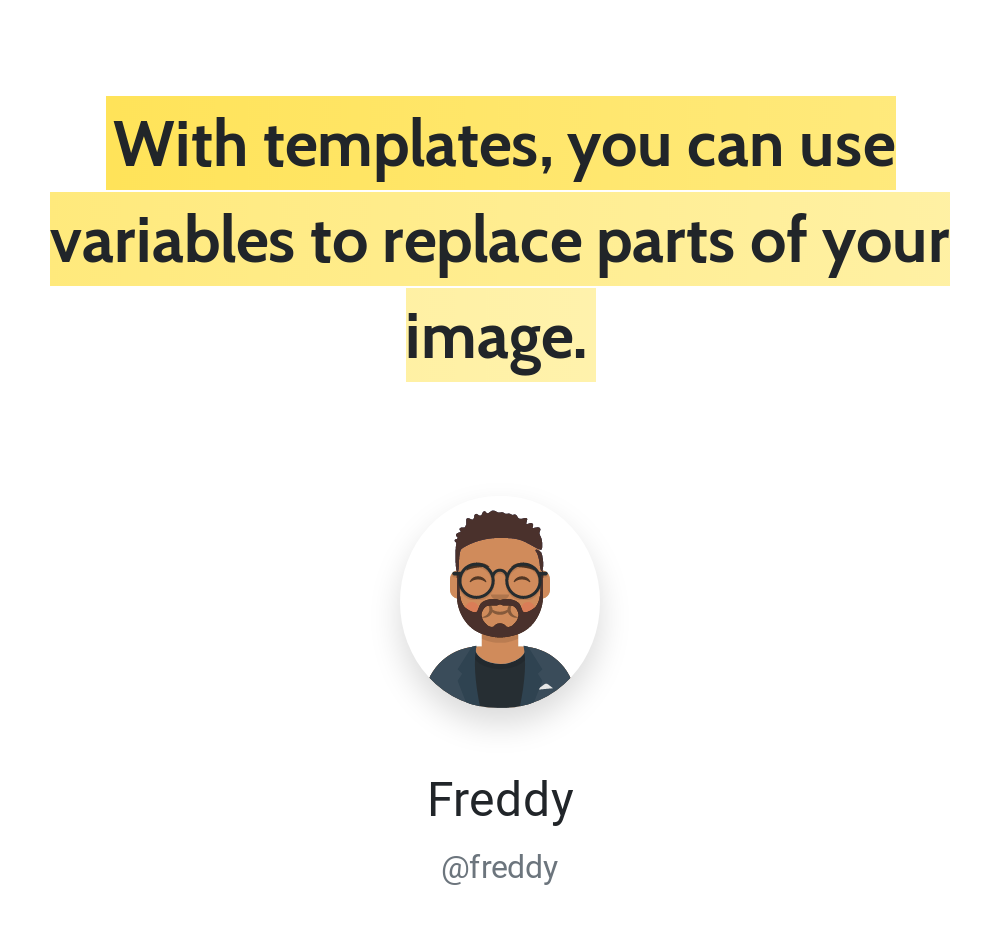
The HTML below uses Bootstrap utility classes; include the corresponding stylesheet in your template to reproduce the styling.
<div class="p-4 text-center mt-4" style="width: 500px"> <span class="tweet-text mb-4"> {{text}} </span> <div class="mt-2 p-4"> <img src="{{avatar_url}}" class="rounded-circle shadow border mt-4" width="100px"> </div> <h4 class="mt-2"> {{name}} </h4> <span class="text-muted">{{username}}</span></div>Creating a template
Section titled “Creating a template”Requires templates:create_update.
To generate a template, make an HTTP request to the API.
https://hcti.io/v1/templateParameters
Section titled “Parameters”Send the following parameters as JSON or form data.
| Name | Type | Description |
|---|---|---|
html (required) |
String |
HTML to render: a snippet (<div>Your content</div>) or an entire webpage. |
css |
String |
The CSS for your image. |
name |
String |
A short name to identify your template max length 64 |
description |
String |
Description to elaborate on the use of your template max length 1024 |
Additional parameters
Section titled “Additional parameters”Optional parameters for greater control over your image.
| Name | Type | Description |
|---|---|---|
color_scheme | String | Set Chrome to render in light or dark mode. Affects websites using prefers-color-scheme. |
device_scale | Double | Control resolution by adjusting the pixel ratio from 0.1 to 3. Higher values increase image quality and file size. |
disable_twemoji | Boolean | Set to true to use native emoji fonts instead of Twemoji. |
google_fonts | String | Load one or more Google fonts, such as Roboto|Open Sans. |
jumbo_max_height | Integer | Maximum output height in jumbo mode, up to 80,000 pixels. Must be set with jumbo_max_width and consumes additional image credits. |
jumbo_max_width | Integer | Maximum output width in jumbo mode, up to 80,000 pixels. Must be set with jumbo_max_height and consumes additional image credits. |
max_wait_ms | Integer | Set a maximum time limit from 500 to 10000 milliseconds for waiting before taking the screenshot. |
media_type | String | Set Chrome to render using screen or print CSS media styles. |
ms_delay | Integer | Delay before generating the image. Useful when waiting for JavaScript; start with 500 milliseconds. |
proxy_id | String | Route outbound traffic through one of your organization's configured HTTP proxies. Available on the 10,000 images/month plan or higher. |
render_when_ready | Boolean | Wait to generate the image until JavaScript calls ScreenshotReady(). |
storage_destination_id | String | Save rendered files to one of your organization's configured storage destinations. Available on the 10,000 images/month plan or higher. |
timezone | String | Set Chrome's timezone with an IANA identifier such as America/New_York. |
transparent_background | Boolean | Set to true to render with a transparent background. |
viewport_height | Integer | Set the height of Chrome's viewport. Both dimensions must be set when using either. |
viewport_landscape | Boolean | Set Chrome's viewport to landscape mode. |
viewport_mobile | Boolean | Set Chrome's viewport to emulate a mobile device. |
viewport_touch | Boolean | Set Chrome's viewport to support touch events. |
viewport_width | Integer | Set the width of Chrome's viewport. Both dimensions must be set when using either. |
Example responses
Section titled “Example responses”STATUS: 201 CREATED{ "template_id": "t-b0354248-e7f6-4cca-81c6-2b4a70a16388", "template_version": 1594409399761}STATUS: 400 BAD REQUEST{ "error": "Bad Request", "statusCode": 400, "message": "HTML is Required"}STATUS: 429 TOO MANY REQUESTS{ "error": "Plan limit exceeded", "statusCode": 429, "message": "The tryit plan is limited to 5 templates"}Editing a template
Section titled “Editing a template”Requires templates:create_update.
To edit an existing template, send a request with the template_id returned when you created it.
https://hcti.io/v1/template/:template_idParameters
Section titled “Parameters”Send the following parameters as JSON or form data.
| Name | Type | Description |
|---|---|---|
html (required) |
String |
HTML to render: a snippet (<div>Your content</div>) or an entire webpage. |
css |
String |
The CSS for your image. |
name |
String |
A short name to identify your template max length 64 |
description |
String |
Description to elaborate on the use of your template max length 1024 |
Additional parameters
Section titled “Additional parameters”Optional parameters for greater control over your image.
| Name | Type | Description |
|---|---|---|
color_scheme | String | Set Chrome to render in light or dark mode. Affects websites using prefers-color-scheme. |
device_scale | Double | Control resolution by adjusting the pixel ratio from 0.1 to 3. Higher values increase image quality and file size. |
disable_twemoji | Boolean | Set to true to use native emoji fonts instead of Twemoji. |
google_fonts | String | Load one or more Google fonts, such as Roboto|Open Sans. |
jumbo_max_height | Integer | Maximum output height in jumbo mode, up to 80,000 pixels. Must be set with jumbo_max_width and consumes additional image credits. |
jumbo_max_width | Integer | Maximum output width in jumbo mode, up to 80,000 pixels. Must be set with jumbo_max_height and consumes additional image credits. |
max_wait_ms | Integer | Set a maximum time limit from 500 to 10000 milliseconds for waiting before taking the screenshot. |
media_type | String | Set Chrome to render using screen or print CSS media styles. |
ms_delay | Integer | Delay before generating the image. Useful when waiting for JavaScript; start with 500 milliseconds. |
proxy_id | String | Route outbound traffic through one of your organization's configured HTTP proxies. Available on the 10,000 images/month plan or higher. |
render_when_ready | Boolean | Wait to generate the image until JavaScript calls ScreenshotReady(). |
storage_destination_id | String | Save rendered files to one of your organization's configured storage destinations. Available on the 10,000 images/month plan or higher. |
timezone | String | Set Chrome's timezone with an IANA identifier such as America/New_York. |
transparent_background | Boolean | Set to true to render with a transparent background. |
viewport_height | Integer | Set the height of Chrome's viewport. Both dimensions must be set when using either. |
viewport_landscape | Boolean | Set Chrome's viewport to landscape mode. |
viewport_mobile | Boolean | Set Chrome's viewport to emulate a mobile device. |
viewport_touch | Boolean | Set Chrome's viewport to support touch events. |
viewport_width | Integer | Set the width of Chrome's viewport. Both dimensions must be set when using either. |
Creating an image with a template
Section titled “Creating an image with a template”Requires images:create.
To generate a templated image, send a request using the template_id from the create response.
https://hcti.io/v1/image/:template_idYou can also generate a templated image with a signed GET URL that renders on demand. See Creating a templated image URL.
To use one template for automatic social cards across an existing site, select it in an OG Image Config. HCTI can map page titles, descriptions, Open Graph metadata, and explicit html:tv: values to its variables.
Parameters
Section titled “Parameters”Send the following parameters as JSON or form data. When using form data, JSON-encode template_values as a string.
| Name | Type | Description |
|---|---|---|
template_values (required) |
JSON |
Values for the variables in your template. For editor templates, see the Variables guide. |
Listing your templates
Section titled “Listing your templates”Requires templates:read.
List your templates with an authenticated GET request.
https://hcti.io/v1/templateExample responses
Section titled “Example responses”STATUS: 200 OK{ "data": [ { "css": null, "created_at": "2020-07-19T17:16:43.987+00:00", "description": null, "device_scale": 2.0, "google_fonts": null, "html": "<blockquote class=\"twitter-tweet\" style=\"width: 400px;\" data-dnt=\"true\">\n<p lang=\"en\" dir=\"ltr\"></p>\n\n<a href=\"{{tweet_link}}\"></a>\n\n</blockquote> <script async src=\"https://platform.twitter.com/widgets.js\" charset=\"utf-8\"></script>", "id": "t-5ff7b966-d32c-4143-bda3-57a440e97a80", "max_wait_ms": null, "ms_delay": 1500, "name": null, "render_when_ready": null, "render_count": 142, "storage_destination_id": "your-storage-destination-id", "color_scheme": null, "timezone": null, "updated_at": "2020-07-19T17:16:43.987+00:00", "version": 1595179003987, "viewport_height": null, "viewport_width": null } ], "pagination": { "next_page_start": null }}Response fields
Section titled “Response fields”| Field | Type | Description |
|---|---|---|
render_count |
Integer |
Number of times this template has been used to generate images. |
storage_destination_id |
String or null |
Storage destination inherited by images created from this template. |
color_scheme |
String |
Light or dark mode setting, if configured. |
timezone |
String |
Timezone setting, if configured. |
Listing your template versions
Section titled “Listing your template versions”Requires templates:read.
List a template’s versions with an authenticated GET request.
https://hcti.io/v1/template/:template_idExample responses
Section titled “Example responses”STATUS: 200 OK{ "data": [ { "css": null, "created_at": "2020-07-19T17:16:43.987+00:00", "description": null, "device_scale": 2.0, "google_fonts": null, "html": "<blockquote class=\"twitter-tweet\" style=\"width: 400px;\" data-dnt=\"true\">\n<p lang=\"en\" dir=\"ltr\"></p>\n\n<a href=\"{{tweet_link}}\"></a>\n\n</blockquote> <script async src=\"https://platform.twitter.com/widgets.js\" charset=\"utf-8\"></script>", "id": "t-5ff7b966-d32c-4143-bda3-57a440e97a80", "max_wait_ms": null, "ms_delay": 1500, "name": null, "render_when_ready": null, "render_count": 142, "storage_destination_id": "your-storage-destination-id", "color_scheme": null, "timezone": null, "updated_at": "2020-07-19T17:16:43.987+00:00", "version": 1595179003987, "viewport_height": null, "viewport_width": null } ], "pagination": { "next_page_start": null }}Deleting a template through the API requires templates:delete. See the interactive API reference for endpoint schemas. Rendering a known template ID uses images:create; discovering templates first requires templates:read.
Need help?
Talk to a human. Email support@htmlcsstoimage.com and we’ll help you get started.